The other day I wanted to add news tags feature to a program, and to make it easy I wanted the user to be able of adding and removing news tags by double clicking a Listbox of available tags and assigned tags.
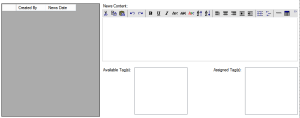
If you need to move items between bound Listboxes you cannot just use the Listbox.Add or Listbox.Remove methods. Instead you should add and remove rows to the Tables which they’re bound to.
This is the code I used:
[vb]
Private Sub AvailableTagListBox_DoubleClick(sender As System.Object, e As System.EventArgs) Handles AvailableTagListBox.DoubleClick
If Not IsNothing(AvailableTagListBox.SelectedItem) Then
‘We are making a new row to be added to the table which then will appear in the listbox
Dim Customer_News_Tags_Row As DataRow = MyDataSet.Customer_News_Tags.NewRow
‘Since I have a Parent and Child relation I’m taking the current parent ID
Dim NewsRow = DirectCast(Me.Customer_NewsBindingSource.Current, DataRowView)
‘Parent ID
Customer_News_Tags_Row("News_ID") = NewsRow("ID")
‘Fill the listbox item display field which I have it bound to
Customer_News_Tags_Row("Tag") = AvailableTagListBox.Text
‘Adding new item to the other listbox by adding new row to its table
MyDataSet.Customer_News_Tags.AddCustomer_News_TagsRow(Customer_News_Tags_Row)
‘Delete the listbox item by deleting the row in its table
MyDataSet.News_Tags.Select("ID=" & AvailableTagListBox.SelectedValue)(0).Delete()
End If
End Sub
Private Sub AssignedTagListBox_DoubleClick(sender As System.Object, e As System.EventArgs) Handles AssignedTagListBox.DoubleClick
If Not IsNothing(AssignedTagListBox.SelectedItem) Then
Dim News_Tags_Row As DataRow = MyDataSet.News_Tags.NewRow
‘I’m using a field called Tag
News_Tags_Row("Tag") = AssignedTagListBox.Text
MyDataSet.News_Tags.AddNews_TagsRow(News_Tags_Row)
‘Here I’m matching with a field I have called Tag to delete from Assigned listbox items
MyDataSet.Customer_News_Tags.Select("Tag=’" & AssignedTagListBox.SelectedValue & "’")(0).Delete()
End If
End Sub
[/vb]
Hope this helps, and if you need any clarifications let me know 🙂