Author Archives: Hasan Bazerbashi

About Hasan Bazerbashi

My name is Hasan Bazerbashi graduated from New York Institute of Technology with B.Sc. in Computer Science. I’m the kind of guy who loves the Computer and everything about it and about Technology. And let’s not forget about Robots! I do .NET programming, and have lot of projects I’ve done using it and lot in my mind that I want to do using this great technology. As for my hobbies, I like taking photos and learning about photography and still an amateur photographer, also I enjoy playing video games from time to time, and of course watching movies and listening to Music.

Set DateTimePicker control value to Null

I achieve this by handling the Binding Source that the control is binding to and enabling the ShowCheckBox property.

The .NET DateTimePicker doesn’t accept blank or NULL value. I’ve seen many posts online that extend the controller to accept NULL value like this one or some other posts to change the formatting to custom and switching back again.

So if you don’t feel like adding a new custom control to your project just handle the underlying data source.

DateTimePicker with CheckBoxesSince I had many of the DateTimePicker controls, I made one function that handles the Leave event of each one like so:

[vb]
Private Sub DateTimePicker_Leave(sender As System.Object, e As System.EventArgs) Handles Inv_OriginalDateTimePicker.Leave
‘Handle the DateTimePicker so when it is unchecked it saves Null value
Dim dt As DateTimePicker = sender

If Not dt.Checked Then
‘Get the current record
Dim row = DirectCast(Me.PO_JobsBindingSource.Current, DataRowView)

row(dt.DataBindings.Item("Value").BindingMemberInfo.BindingField.ToString) = DBNull.Value

End If
End Sub
[/vb]

Share

Moving items between bound Listboxes

The other day I wanted to add news tags feature to a program, and to make it easy I wanted the user to be able of adding and removing news tags by double clicking a Listbox of available tags and assigned tags.
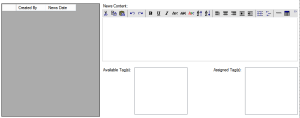
How I wanted Listboxes Tags to work

If you need to move items between bound Listboxes you cannot just use the Listbox.Add or Listbox.Remove methods. Instead you should add and remove rows to the Tables which they’re bound to.

This is the code I used:

[vb]
Private Sub AvailableTagListBox_DoubleClick(sender As System.Object, e As System.EventArgs) Handles AvailableTagListBox.DoubleClick
If Not IsNothing(AvailableTagListBox.SelectedItem) Then
‘We are making a new row to be added to the table which then will appear in the listbox
Dim Customer_News_Tags_Row As DataRow = MyDataSet.Customer_News_Tags.NewRow
‘Since I have a Parent and Child relation I’m taking the current parent ID
Dim NewsRow = DirectCast(Me.Customer_NewsBindingSource.Current, DataRowView)
‘Parent ID
Customer_News_Tags_Row("News_ID") = NewsRow("ID")
‘Fill the listbox item display field which I have it bound to
Customer_News_Tags_Row("Tag") = AvailableTagListBox.Text

‘Adding new item to the other listbox by adding new row to its table
MyDataSet.Customer_News_Tags.AddCustomer_News_TagsRow(Customer_News_Tags_Row)
‘Delete the listbox item by deleting the row in its table
MyDataSet.News_Tags.Select("ID=" & AvailableTagListBox.SelectedValue)(0).Delete()

End If

End Sub

Private Sub AssignedTagListBox_DoubleClick(sender As System.Object, e As System.EventArgs) Handles AssignedTagListBox.DoubleClick
If Not IsNothing(AssignedTagListBox.SelectedItem) Then

Dim News_Tags_Row As DataRow = MyDataSet.News_Tags.NewRow
‘I’m using a field called Tag
News_Tags_Row("Tag") = AssignedTagListBox.Text

MyDataSet.News_Tags.AddNews_TagsRow(News_Tags_Row)
‘Here I’m matching with a field I have called Tag to delete from Assigned listbox items
MyDataSet.Customer_News_Tags.Select("Tag=’" & AssignedTagListBox.SelectedValue & "’")(0).Delete()

End If
End Sub
[/vb]

Hope this helps, and if you need any clarifications let me know 🙂

Share

Move project to another Visual Studio Online account

Let’s say you have a project source hosted in your private Visual Studio Online (Team Foundation Service) account and you want to move it to another account. The easiest way I found is to connect to the new account from Visual Studio (File->Connect to Team Project) and add the items to the source control:

TFS Add Items

Assuming you already have the source on your computer, just select them to be added. Also It will ask you to map a new work space for this new source:

TFS Map WorkSpace

Hit finish and then you are ready to check in the files.

I’ve been using Visual Studio Online for few months now since it was in beta when it was called Team Foundation Service and I totally love it!

The service gives you the ability to collaborate for free for up to 5 members and then you need to license users. I used it to collaborate with a friend and it gave us great help and it was very easy to use. Even though it is great for collaboration but I think you can use it also on your own for good maintenance.

Share

GameMaker Studio with Visual Studio 2013 settings

If you are trying to use GamerMaker Studio wih Visual Studio 2013 and getting the error Unable to validate WinJS API Reference even though you prepared the requirements you have to change the settings to point to Visual Studio 2013 directory and change the WinJS version to 2 like in the following screenshot:

Game Maker VS2013

Note that I have pointed the Windows SDk to 8.1 since I’ve got Windows 8.1.


Share

Crystal Reports Unknown Database Connector Error

I was working on a report which involved several tables and relationships between these tables.

I made sure that I’ve loaded and filled the table sources I tried launching my report but kept on getting the error “Unknown Database Connector Error”.

After a little bit of debugging what I suspected was true. You have to make sure that the tables or the tables’ links are executed in a correct order that doesn’t break the relations.
Basically it is best to load the father tables and then children tables.

To do that open the Database Expert which comes with Crystal Reports -> Links -> Order Links

Crystal Reports Link Order

It worked for me without checking the “Link ordering is enforced”.

Hope this helps 🙂

Share